
Adding a New Organization
Users have the ability to belong to multiple organizations simultaneously.
This is particularly relevant for Kriah specialists who work in multiple schools or for teachers who tutor students who aren’t part of the school.
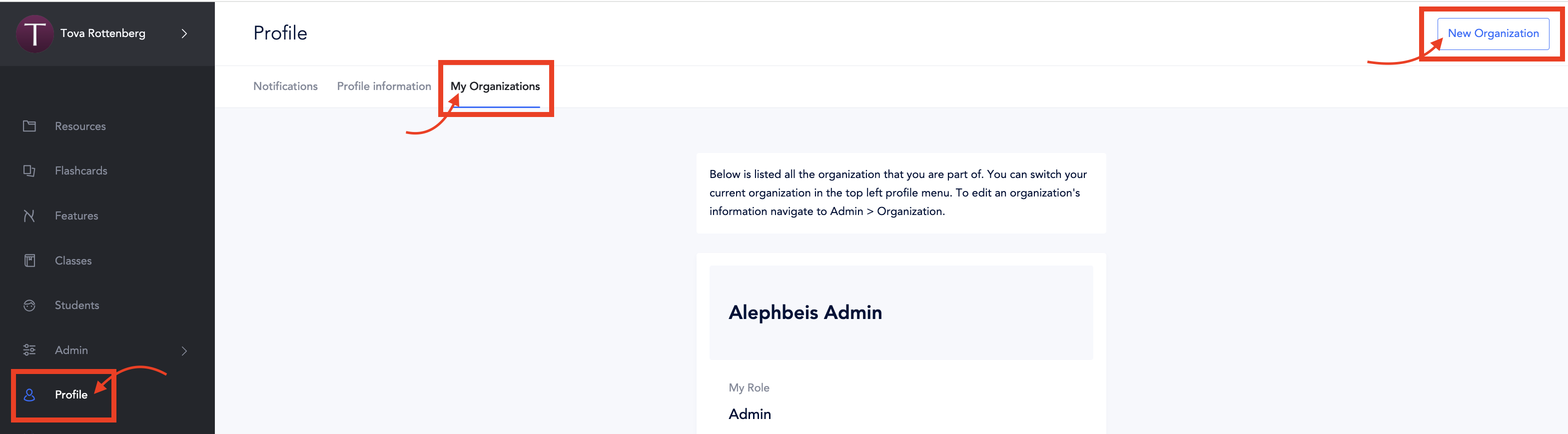
To add an organization to your account:
1. Go to Profile
2. Select My Organizations
3. Click on New Organization
See this article on how to quickly navigate between organizations.
Q & A
Question: I work at multiple schools and would like to have separate Alephbeis accounts for each. Will these accounts be connected in any way?
Answer: No, your accounts will not be linked. You can seamlessly switch between the two accounts, but they will remain completely separate. For guidance on how to easily switch between accounts, please refer to this article.